
How Much Internet Speed Do You Need?
Add the official download and upload requirements of simultaneous applications, then choose a plan with room for overhead, variation, and background traffic. Also check latency, data caps, Wi-Fi coverage, and actual measured performance.
.jpg)
Choose internet speed from the activities that happen at the same time, not the total number of devices in the home.
A household with fifty mostly idle smart devices may need less capacity than a household with:
- Two simultaneous video meetings
- A 4K stream
- Cloud backup
- Security-camera upload
Quick answer: Add the official download and upload requirements of simultaneous applications, then choose a plan with room for overhead, variation, and background traffic. Also check latency, data caps, Wi-Fi coverage, and actual measured performance.
Start with simultaneous use
List the busiest realistic period.
Example evening:
- One 4K Netflix stream
- One Zoom 1080p call
- One Teams meeting
- Web browsing
- Cloud backup paused
Official application recommendations give a baseline.
They are not plan guarantees because:
- Applications adapt
- Several streams may arrive at once
- Wi-Fi adds variability
- Provider performance varies
- Background traffic exists
- Remote servers differ
Current official application values
The values below come from the application providers and should be reverified before publication.
| Activity | Official recommended bandwidth |
|---|---|
| Netflix HD 720p | 3 Mbps download |
| Netflix Full HD 1080p | 5 Mbps download |
| Netflix Ultra HD 4K | 15 Mbps download |
| Zoom 1:1 720p video | 1.2 Mbps upload and download |
| Zoom group 720p video | 2.6 Mbps upload, 1.8 Mbps download |
| Zoom 1080p video | 3.8 Mbps upload, 3.0 Mbps download |
| Microsoft Teams one-to-one video, recommended | 1.5 Mbps upload and download |
| Microsoft Teams meetings, recommended | 2.5 Mbps upload, 4.0 Mbps download |
| Microsoft Teams best-performance guidance | 4.0 Mbps upload and download per endpoint |
Netflix publishes 3, 5, and 15 Mbps recommendations for 720p, 1080p, and 4K.[1]
Zoom publishes separate upload and download recommendations by meeting type and resolution.[2]
Microsoft publishes minimum, recommended, and best-performance bandwidth per endpoint.[3]
These numbers change. The source date and retrieval date must remain visible in the Batch 6 evidence records.
Example household calculation
.jpg)
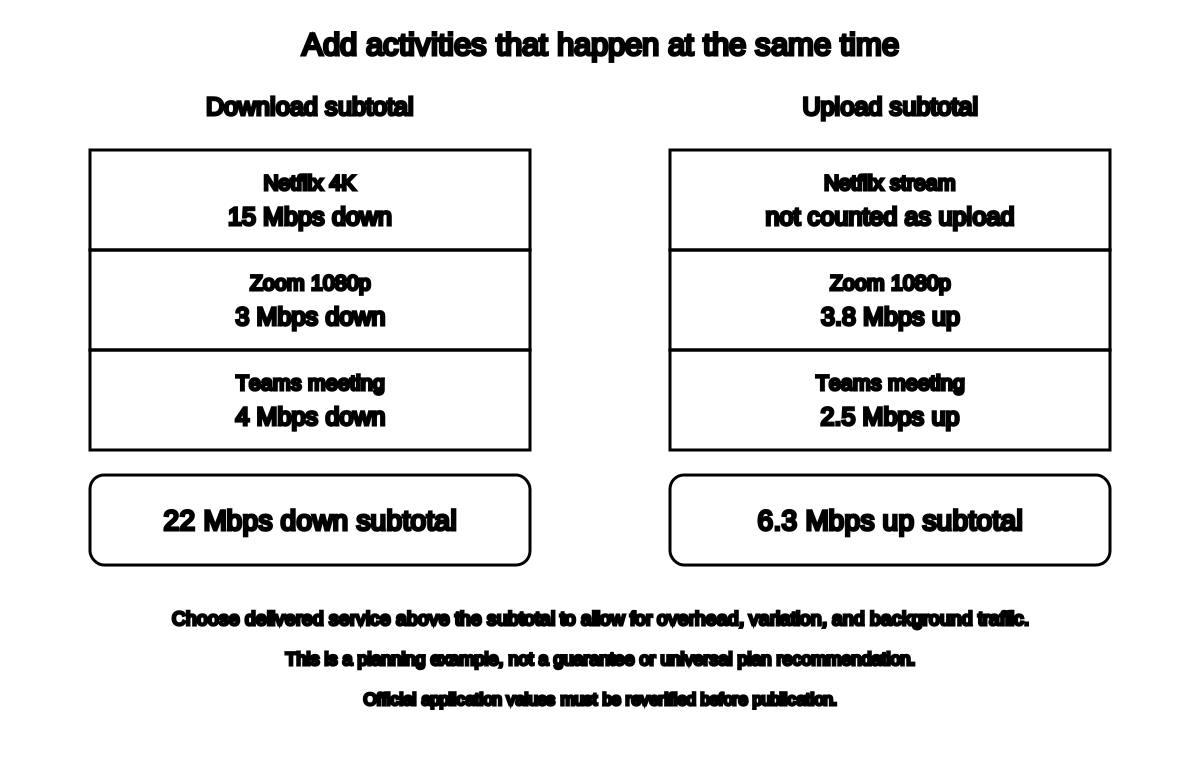
Suppose the busiest period includes:
- One Netflix 4K stream: 15 Mbps down
- One Zoom 1080p call: 3.8 Mbps up, 3.0 Mbps down
- One Teams meeting: 2.5 Mbps up, 4.0 Mbps down
Official-application subtotal:
Download:
15 + 3 + 4 = 22 MbpsUpload:
3.8 + 2.5 = 6.3 MbpsA plan that delivers only 25 Mbps down and 7 Mbps up under perfect conditions leaves little room for:
- Protocol overhead
- Wi-Fi variation
- Other browsing
- Updates
- Cloud sync
- Application bursts
- Provider variation
Choose a tier above the calculated simultaneous demand rather than matching it exactly.
Do not convert that planning margin into a universal percentage guarantee.
FCC’s 100/20 benchmark is not a household calculator
The FCC now uses 100 Mbps download and 20 Mbps upload as an important fixed-broadband reference threshold in current availability work.[4]
That does not mean:
- Every household requires exactly 100/20
- 100/20 guarantees good Wi-Fi
- A family cannot need more
- A single person cannot use less
- Latency and reliability no longer matter
Use it as a national broadband reference, not a personalized recommendation.
Household profiles
One person, ordinary use
Typical simultaneous use:
- Browsing
- One HD or 4K stream
- Occasional video call
- Updates
A stable plan delivering well above the busiest application’s requirements may be sufficient.
Do not buy Gigabit service solely because the phone lists several apps.
Two remote workers
Possible simultaneous use:
- Two video calls
- Screen sharing
- Cloud documents
- VPN
- File upload
- Background sync
Upload, latency, and reliability may matter as much as download.
Ethernet or strong Wi-Fi placement can matter more than moving from one already-adequate download tier to another.
Family with several streams
Possible simultaneous use:
- Two or three streams
- Gaming
- Video call
- Updates
- Smart-home traffic
Add the active streams and calls.
Idle smart devices usually do not each consume a continuous video stream.
Creator or large-file household
Possible demands:
- Video upload
- Livestream
- Cloud backup
- Remote editing
- Large project sync
- Self-hosted services
Upload speed and data caps become central.
Gaming household
Game downloads can use high download capacity.
Actual gameplay often uses less bandwidth than video streaming, but depends heavily on:
- Latency
- Jitter
- Packet loss
- Server route
- Upload congestion
- Wi-Fi stability
Do not buy a faster plan expecting it to reduce distant-server latency automatically.
Plan speed versus Wi-Fi speed
A 1 Gbps plan does not deliver 1 Gbps to every wireless device.
Wi-Fi performance depends on:
- Router
- Device
- Band
- Channel width
- Interference
- Distance
- Walls
- Backhaul
- Other clients
Before upgrading the plan:
- Test Ethernet.
- Test beside the router.
- Test problem rooms.
- Pause background traffic.
- Check the current plan.
- Check modem and router capability.
- Check whether upload is the real bottleneck.
The existing plan may be adequate while the local network is not.
Data caps
Speed and data allowance are different.
A fast plan may still have:
- Monthly data cap
- Overage fee
- Reduced speed
- Priority limits
- Video restrictions
- Fixed-wireless congestion policy
Estimate monthly data when:
- Streaming many hours
- Downloading large games
- Backing up media
- Using cellular or satellite
- Running cameras
Do not recommend a plan without reviewing its current terms.
Latency and low-latency service
FCC broadband data uses a low-latency classification based on round-trip performance.[4]
Households using:
- Video calls
- Gaming
- Remote desktop
- Telehealth
- Voice
should compare latency and reliability, not only Mbps.
Technology can matter:
- Fiber
- Cable
- Fixed wireless
- Satellite
- DSL
- Mobile
But provider implementation and route matter too.
Upload requirements are per active sender
For video meetings, upload demand grows with the number of active endpoints.
A family with three simultaneous outgoing video calls should not compare the plan’s upload rate with one person’s Zoom number.
Add the concurrent upstream demands.
Microsoft notes that Teams bandwidth values are per endpoint.[3]
Wi-Fi and plan diagnosis checklist
Before upgrading:
- Wired test is slow too
- Plan speed is below simultaneous application need
- Upload is saturated
- Provider confirms no outage
- Modem supports target plan
- Router WAN/LAN ports support target plan
- Data cap and contract reviewed
- Actual price after promotion reviewed
- Equipment rental reviewed
- Higher tier is available at the address
If only one room is slow, fix Wi-Fi.
If every device is slow over Ethernet, inspect service and equipment.
Buying guidance without a provider recommendation
Compare current offers at the address for:
- Delivered download
- Delivered upload
- Latency
- Data cap
- Monthly price
- Introductory period
- Equipment fee
- Installation fee
- Contract
- Price increase
- Customer-owned equipment support
- Technology
- Reliability
- Support
Batch 6 does not recommend an exact plan or ISP.
Availability, terms, and performance are local and change frequently.
Frequently asked questions
Is 100 Mbps enough?
It can be for many households, depending on simultaneous use, upload, latency, Wi-Fi, and delivered performance.
Do I need Gigabit internet?
Only when real simultaneous demand, large transfers, local infrastructure, or other needs justify it. Many households do not use a full Gigabit continuously.
How much upload do I need for video calls?
Add the official upload requirements of simultaneous calls. Zoom and Teams publish separate upstream values.
Why is my 1 Gbps plan slow?
The bottleneck may be Wi-Fi, device, port, cable, router, modem, provider congestion, or server.
Does more speed lower ping?
Not necessarily. More capacity can prevent congestion, but distance, routing, and technology still determine latency.
Related guides
Source notes
- Netflix-recommended internet speedsNetflix Help Center
- Zoom system requirements: Windows, macOS, LinuxZoom Support
- Prepare your organization's network for TeamsMicrosoft Learn
- How to Format Fixed Broadband Availability PolygonsFederal Communications Commission
- Troubleshoot video and audio quality in a meetingGoogle Meet Help
- How to Use the FCC's National Broadband MapFederal Communications Commission
See something wrong or out of date? Report a correction.