
Does Aluminum Foil Improve Wi-Fi Signal?
A carefully shaped reflector can redirect Wi-Fi. Random foil is uncontrolled. It may improve one test point, worsen another, interfere with antennas, or block ventilation. Fix placement and dead zones first.

Aluminum can reflect Wi-Fi radio energy, so a reflector may strengthen coverage in one direction while weakening it in another.
But the well-known research did not show that crumpling kitchen foil behind any router guarantees better Wi-Fi.
The researchers:
- Modeled the room
- Identified where signal should become stronger or weaker
- Computed an optimized three-dimensional reflector shape
- 3D printed the shape
- Coated it with a thin metal layer such as aluminum foil
- Positioned it around the access point[1][2]
Quick answer: A carefully shaped reflector can redirect Wi-Fi. Random foil is uncontrolled. It may improve one test point, worsen another, interfere with antennas, or block ventilation. Fix placement and dead zones first.
What the 2017 study found
The Dartmouth-led BuildSys 2017 paper was titled “Customizing Indoor Wireless Coverage via 3D-Fabricated Reflectors.”[1]
The optimized reflectors changed signal strength in targeted regions by:
- Up to 6 dB stronger
- Up to 10 dB weaker
The resulting throughput changes reached:
- Up to 55.1% higher
- Up to 63.3% lower[1]
Those maximum experimental results demonstrate directional control, not a household guarantee.
Why the shape mattered
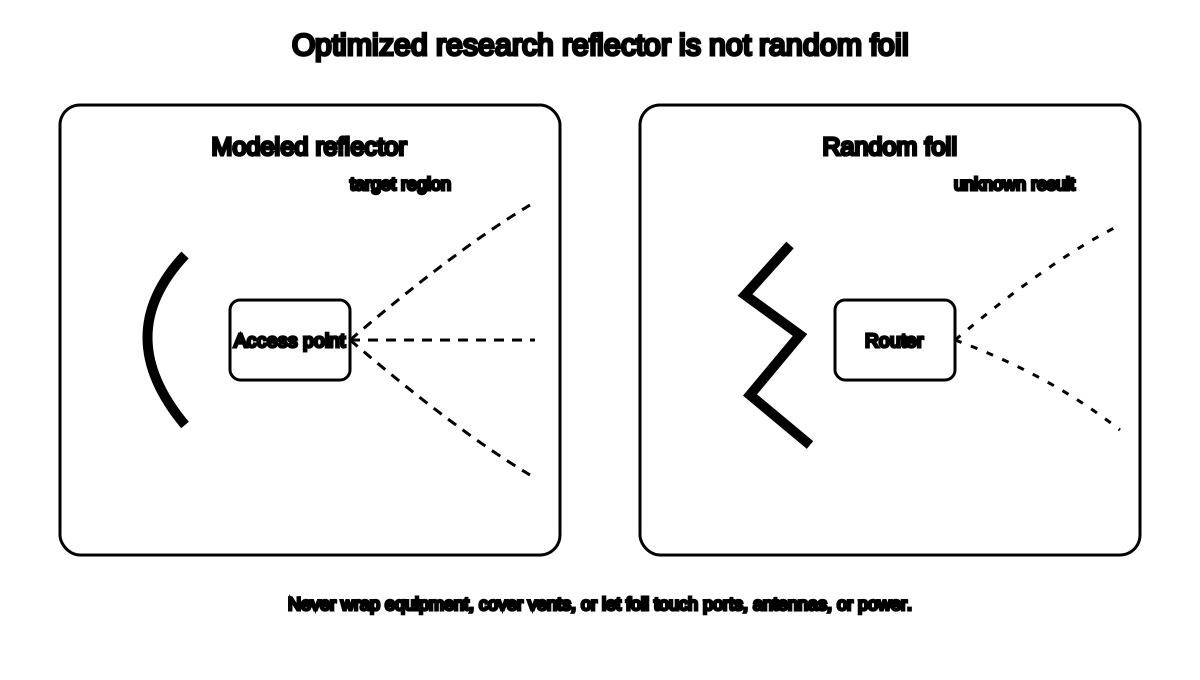
The system used:
- Room geometry
- Walls and partitions
- Access-point position
- Antenna information
- Desired coverage areas
- Radio-propagation modeling
- Iterative shape optimization[1]
The final shape was tailored to the environment.
A sheet of foil bent by eye has none of that optimization.
Foil redirects; it does not create radio power
A passive reflector does not increase the router’s transmitter power.
It changes where some energy travels.
That means:
- A room in front may improve.
- A room behind may worsen.
- Neighboring coverage may shrink.
- Multipath behavior may change.
- Devices may switch bands or access points differently.
Measure the whole required coverage area, not one phone in one chair.
Do not wrap the router
Never:
- Wrap the router in foil
- Cover vents
- Touch foil to ports
- Let foil contact power connectors
- Rest metal directly on antennas
- Block a fan
- Create an unstable object above the equipment
- Violate manufacturer clearance instructions
Wrapping the equipment can trap heat and disrupt coverage.
The research used a mounted reflector around the access point, not a foil cocoon for electronics.
A safer optional experiment
This is an experiment, not a recommended fix.
First complete the free, supported fixes:
- Test beside the router and in the weak room.
- Move the router centrally.
- Raise it.
- Remove cabinets and obstructions.
- Try 2.4 GHz and 5 GHz.
- Update supported firmware.
- Map the dead zone.
If coverage still needs directional adjustment:
- Use a freestanding nonconductive backing.
- Keep foil away from the router, cables, and antennas.
- Leave ventilation unobstructed.
- Test a smooth shallow curve behind one side.
- Record results at every important room.
- Remove it if instability or heat appears.
Do not attach metal to the router.
Test correctly
At minimum:
- Use the same device.
- Use the same locations.
- Test at the same approximate time.
- Record the connected band.
- Run several tests.
- Record signal, speed, latency, and disconnects.
- Test rooms both in front of and behind the reflector.
One faster speed test can be normal variation.
Why results can be inconsistent
Wi-Fi indoors already reflects from:
- Walls
- Metal appliances
- Ductwork
- Furniture
- Glass
- Floors
- People
A new reflector changes the multipath environment.
Small changes in:
- Shape
- Angle
- Distance
- Router antenna pattern
- Device location
- Frequency band
can change the result.
Security limits
The research discussed weakening signal in unwanted regions as a physical-security supplement.[1]
A reflector is not a replacement for:
- WPA2 or WPA3
- Strong passwords
- Firmware updates
- Guest networks
- Device management
- Disabling insecure settings
A determined nearby receiver may still detect the network.
Better fixes
For most households, better first options are:
- Router placement
- Correct frequency band
- Wired access point
- Correctly placed extender
- Compatible mesh system
- Router replacement when support has ended
The right choice depends on the diagnosis.
Frequently asked questions
Did scientists prove kitchen foil boosts Wi-Fi?
They proved that optimized 3D reflectors coated with metal could alter coverage in their test environments. That is not the same as generic kitchen foil.
Can foil make Wi-Fi worse?
Yes. It can redirect energy away from rooms that need it.
Is a soda can reflector the same thing?
No. The paper cites anecdotal directional-reflector experiments, then develops a more systematic optimized approach.
Can foil damage the router?
It can create problems if it blocks ventilation, contacts electrical parts, interferes with antennas, or falls onto equipment.
Should I buy a reflector?
Batch 5 makes no product recommendation. Fix placement and coverage first.
Related guides
- Choose a better router location
- Try free Wi-Fi dead-zone fixes
- Use the Wi-Fi dead-zone checklist
- Use the appliance electricity cost calculator
Source notes
- Customizing Indoor Wireless Coverage via 3D-Fabricated ReflectorsACM BuildSys 2017
- Customizing Indoor Wireless Coverage via 3D-Fabricated ReflectorsDartmouth College
- Wi-Fi and your home layoutMicrosoft Support
- How to improve Nest Wifi Pro, Nest Wifi or Google Wi-Fi speed and performanceGoogle Nest Help
See something wrong or out of date? Report a correction.